Se afișează postările cu eticheta Laptop. Afișați toate postările

joi, 27 iunie 2013

Computex 2013

Jonney Shih introduces its new product called the 'ASUS Transformer Book Trio', the world's first three-in-one mobile device during a press conference ahead of the opening of the Computex trade fair in Taipei on June 3, 2013.
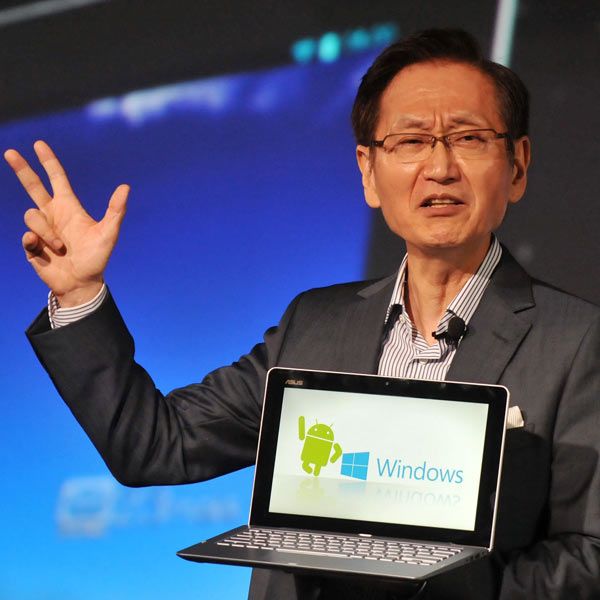
Jonney Shih introduces its new product called the 'ASUS Transformer Book Trio', the world's first three-in-one mobile device during a press conference ahead of the opening of the Computex trade fair in Taipei on June 3, 2013.


Asustek's new product ASUS Transformer Book Trio, an 11.6-inch device combined notbook, tablet and desktop, is displayed during a news conference as part of media preview of the 2013 Computex exhibition in Taipei.

Asustek's new product ASUS Transformer Book Trio, an 11.6-inch device combined notbook, tablet and desktop, is displayed during a news conference as part of media preview of the 2013 Computex exhibition in Taipei.


Intel Corporation's Executive Vice President Tom Kilroy (R) holds a tablet/laptop hybrid for a photo call with Taiwanese pop star Jolin Tsai during the opening of Taiwan's Computex 2013, one of the world's largest IT exhibitions, in Taipei, Taiwan.
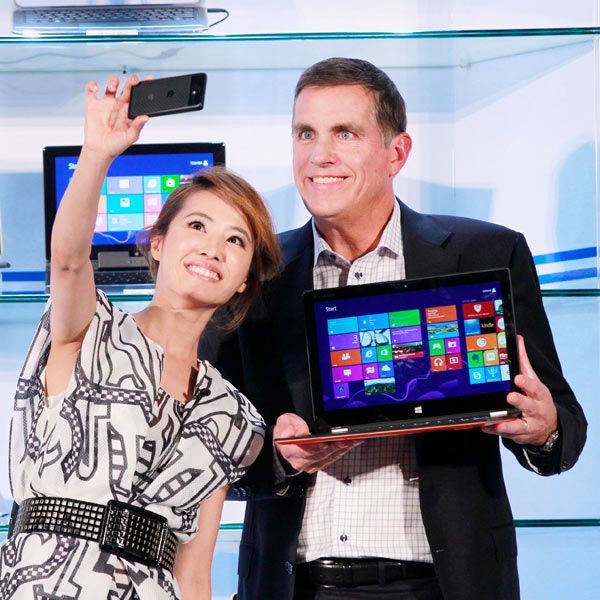
Intel Corporation's Executive Vice President Tom Kilroy (R) holds a tablet/laptop hybrid for a photo call with Taiwanese pop star Jolin Tsai during the opening of Taiwan's Computex 2013, one of the world's largest IT exhibitions, in Taipei, Taiwan.


Asustek's new product ASUS fonepad Note, a 6-inch device combined tablet and smartphone, is displayed during a news conference as part of media preview of the 2013 Computex exhibition in Taipei on June 3, 2013.
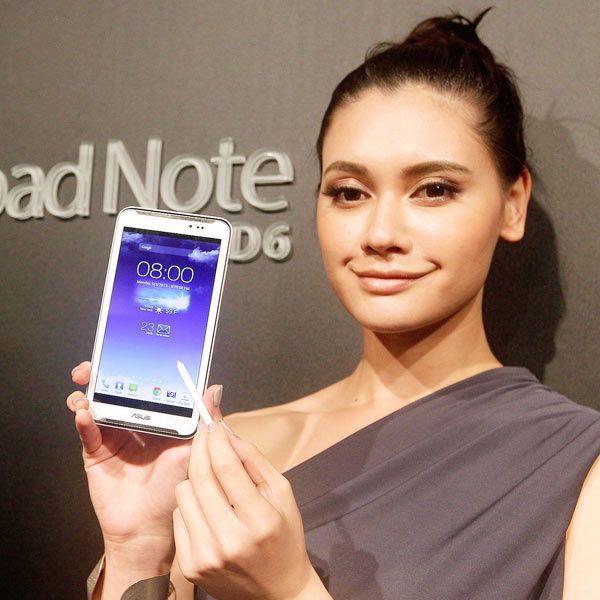
Asustek's new product ASUS fonepad Note, a 6-inch device combined tablet and smartphone, is displayed during a news conference as part of media preview of the 2013 Computex exhibition in Taipei on June 3, 2013.


A visitor looks at motherboards at the MSI booth at the 2013 Computex exhibition at the TWTC Nangang exhibition hall in Taipei June 4, 2013.

A visitor looks at motherboards at the MSI booth at the 2013 Computex exhibition at the TWTC Nangang exhibition hall in Taipei June 4, 2013.


Asustek Computer Inc Chairman Jonney Shih speaks about the company's new product ASUS Transformer Pad Infinity, a 10.1-inch device combined tablet and PC, during a news conference as part of media preview of the 2013 Computex exhibition in Taipei on June 3, 2013.
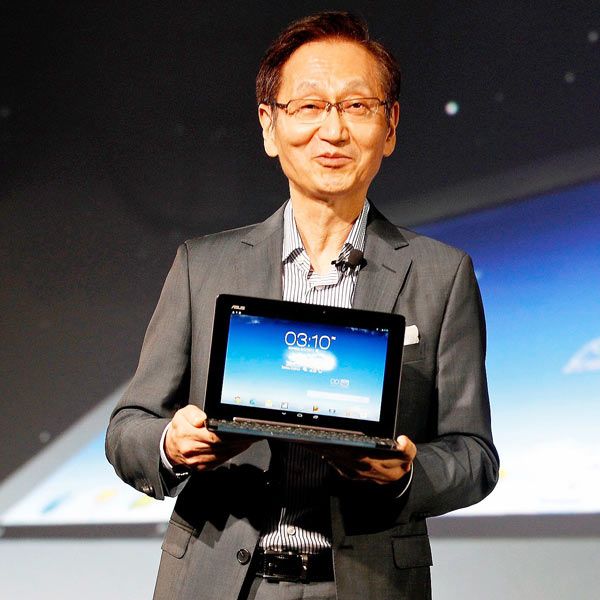
Asustek Computer Inc Chairman Jonney Shih speaks about the company's new product ASUS Transformer Pad Infinity, a 10.1-inch device combined tablet and PC, during a news conference as part of media preview of the 2013 Computex exhibition in Taipei on June 3, 2013.


A woman displays a smart watch developed by Sonostar during Computex 2013 in Taipei, Taiwan. The device is scheduled to hit market in the third quarter, with a price tag of 179 USD.
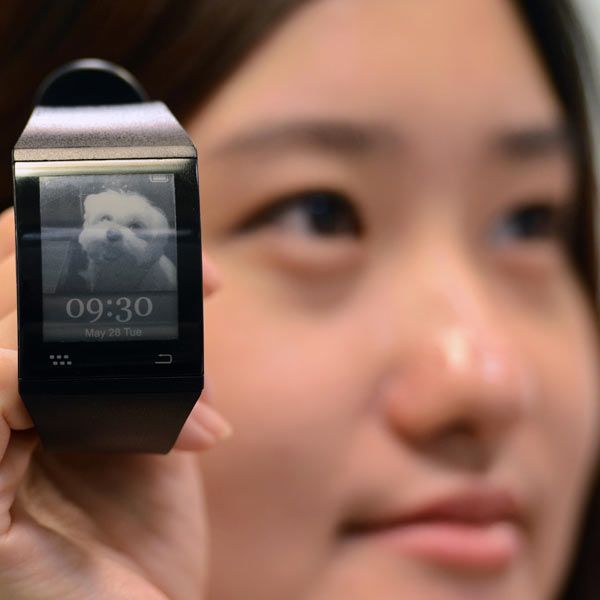
A woman displays a smart watch developed by Sonostar during Computex 2013 in Taipei, Taiwan. The device is scheduled to hit market in the third quarter, with a price tag of 179 USD.


Acer's Chairman JT Wang poses for cameras during an interview before the opening of the Computex exhibition at the Taipei International Convention Center in Taipei on June 3, 2013.
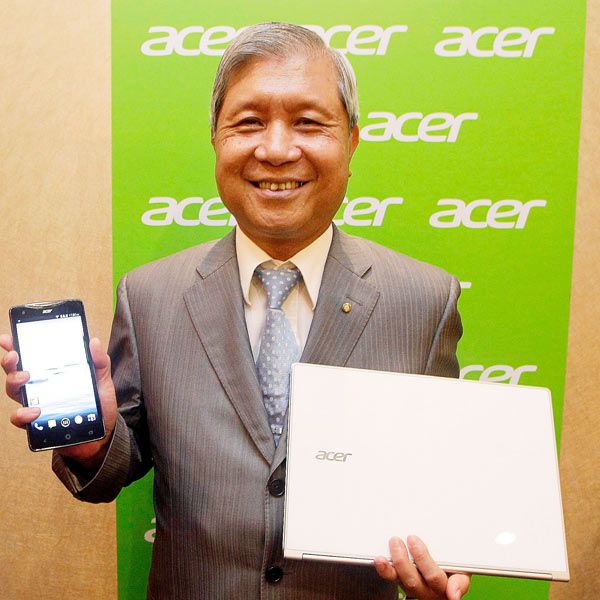
Acer's Chairman JT Wang poses for cameras during an interview before the opening of the Computex exhibition at the Taipei International Convention Center in Taipei on June 3, 2013.


Jonney Shih, Chairman of Taiwan's ASUSTek Computer Inc., introduces its new product called the 'ASUS MeMO Pad HD 7', the world's first three-in-one mobile device during a press conference ahead of the opening of the Computex trade fair in Taipei on June 3, 2013.

Jonney Shih, Chairman of Taiwan's ASUSTek Computer Inc., introduces its new product called the 'ASUS MeMO Pad HD 7', the world's first three-in-one mobile device during a press conference ahead of the opening of the Computex trade fair in Taipei on June 3, 2013.


Jim Wong, JT Wang and Michael Birkin pose with their new products at an international press conference on the eve of the opening of Computex 2013 in Taipei, Taiwan.
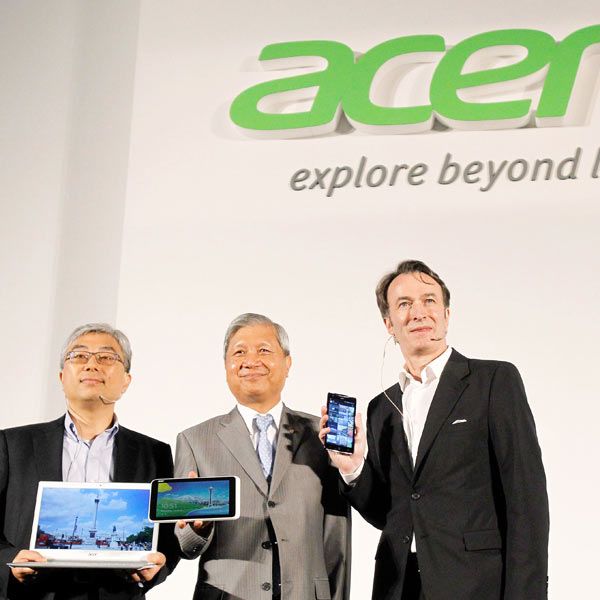
Jim Wong, JT Wang and Michael Birkin pose with their new products at an international press conference on the eve of the opening of Computex 2013 in Taipei, Taiwan.


Intel Corporation's Executive Vice President Tom Kilroy delivers the keynote speech at the opening of Taiwan's Computex 2013 in Taipei, Taiwan.

Intel Corporation's Executive Vice President Tom Kilroy delivers the keynote speech at the opening of Taiwan's Computex 2013 in Taipei, Taiwan.


An Acer employee displays a new tablet-laptop hybrid Aspire R7 at an international press conference on the eve of the opening of Computex 2013 in Taipei.

An Acer employee displays a new tablet-laptop hybrid Aspire R7 at an international press conference on the eve of the opening of Computex 2013 in Taipei.


Acer Inc.'s Associated Vice President of Mobile Computing David Lee and Acer President Jim Wong describe features of the new Aspire S7 Ultrabook at an international press conference on the eve of the opening of Computex, one of the world's largest IT exhibitions, in Taipei.
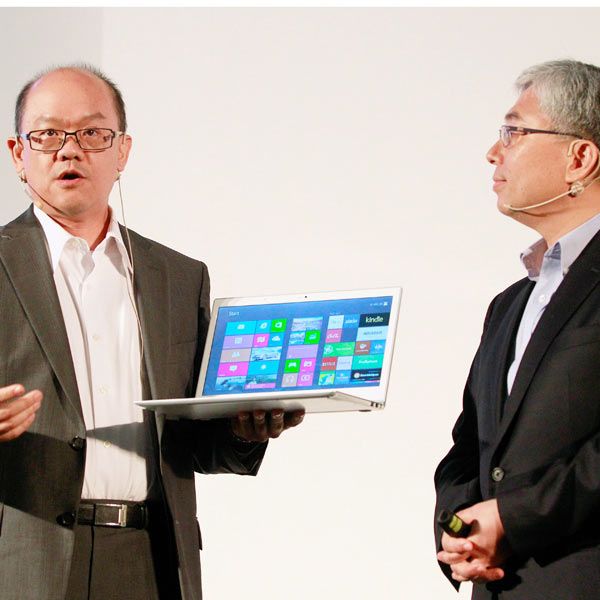
Acer Inc.'s Associated Vice President of Mobile Computing David Lee and Acer President Jim Wong describe features of the new Aspire S7 Ultrabook at an international press conference on the eve of the opening of Computex, one of the world's largest IT exhibitions, in Taipei.


Young Liu , Foxconn general manager of innovating Dial System Business Group (iDSBG) speaks during a press conference ahead of the opening of the Computex trade fair in Taipei on June 3, 2013.

Young Liu , Foxconn general manager of innovating Dial System Business Group (iDSBG) speaks during a press conference ahead of the opening of the Computex trade fair in Taipei on June 3, 2013.


Krik Skaugen, senior vice president and general manager of the PC Client Group, speaks during a press conference in Taipei on June 4, 2013.
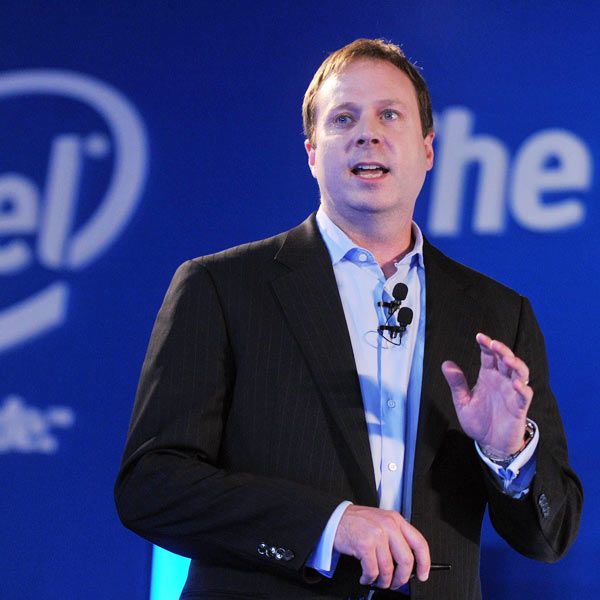
Krik Skaugen, senior vice president and general manager of the PC Client Group, speaks during a press conference in Taipei on June 4, 2013.

joi, 3 ianuarie 2013

HP targets enterprise users with EliteBook Revolve convertible tablet


With the success of the iPad, it’s easy to forget that convertible units with a rotating hinge and physical keyboard were once the form factor of choice for tablet computers. While touchscreen-only devices now dominate the consumer space, convertible tablets continue to find a market, particularly amongst business and government users. It is these markets that HP is targeting with its latest touch-enabled convertible tablet, the EliteBook Revolve, which is due for a March, 2013 release.

Powered by third-generation Intel Core processors and with 4 Gb of RAM, the EliteBook Revolve features a touch-enabled, 11.6-inch, 1,366 x 768 pixel resolution display that pivots and twists to switch between traditional laptop and tablet form factors. The display is made from scratch-resistant Gorilla Glass 2, while the all-magnesium chassis helps keep the unit’s weight down around 3.04 lb (1.37 kg) – that figure is based on the preproduction model, as is the estimated 22.4 mm thickness of the device.

The full-sized physical QWERTY keyboard features a backlight and is spill-resistant, while the screen orientation and brightness will adjust according to the unit’s position. Connectivity features include optional WWAN (LTE in the U.S. and HSPA+ elsewhere), secure NFC, Bluetooth, Ethernet port, two USB 3.0 ports and a DisplayPort.


Onboard storage comes in the form of a 256 GB SSD, with a 720p HD4 camera positioned above the display, a dual-microphone array, DTS Studio Sound and CyberLink’s YouCam software also on board. An optional pen is also available for touchscreen input. The battery should be good for eight to ten hours of use, and 210 hours of standby.

Although it has been optimized for Windows 8, HP will offer the option of preloading the EliteBook Revolve with Windows 7 for those not yet prepared to jump on the Metro train.

The EliteBook Revolve is that latest bid by HP to grab a slice of the growing enterprise tablet market. In October it announced the business-oriented ElitePad 900 boasting a rugged form factor and compatibility with Smart Jacket peripherals. The company has also announced a new Multi-Tablet Charging Module that can store and charge up to 10 tablet PCs with screen sizes under 10.1 inches from a single power outlet.

Like the ElitePad 900, the Multi-Tablet Charging Module will be available in the U.S. in January. It will be priced at US$499. Pricing of the EliteBook Revolve will be announced closer to its March, 2013 release date.

Source: HP

marți, 1 mai 2012

Acer Iconia the Real Dual Screen Laptop


Acer Iconia will be the futuristic concept of laptop with their dual screen feature. which ditches the physical keyboard to get laptops to compete with the tablets style-on. Now, that may seem confusing, but then a laptop sans a keyboard could be dubbed a tablet, what say? Introduced at the Acer Global Press event in New York City, the concept laptop, called the Acer Iconia has two 14-inch touchscreen displays attached by a hinge. Scheduled to run Window 7, the laptop’s top screen functions as the primary screen, while the one below serves as a navigation panel, displaying things like the keyboard, touch wheel and on-screen controls etc, the display can also work as an extension for the primary display.

Here's the specification of this Dual Screen laptop named Acer Iconia.


The laptop weighing in at about 6.1 pounds features an Intel Core i5 480 processor, 4GB of RAM, 640GB hard drive and Clear-fi, a device networking intiative for media sharing. In addition to an Acer’s interface overlay – Acer Ring, which makes accessing documents and Web pages, resizing pictures and navigating through content library very easy, the laptop will have two USB 2.0 ports, one USB 3.0, HDMI-out, a 1.3-megapixel Webcam and Bluetooth. Acer claims the laptop would be available in US markets by Christmas or latest by January, but also confirms that there will be no SDK available for it until December, so you may have to live with limited customized software Acer has designed initially.

More pics of Acer Iconia after the jump


Via : PCworld

duminică, 29 aprilie 2012

Prime Zenbook new laptop with a processor Ivy Bridge and IPS screen

                         Asus is preparing the launch of two new notebooks - Zenbooks Prime. Models will offer screens with 11.6 or 13.3 inches with a resolution of 1080p.


                        Engadget Chinese branch of service has gathered information on the latest laptops from Asus, even before their official release. Devices with screen diagonals of 11.6, and 13.3 inches to be named  Zenbook Prime and will be numbered accordingly and UX31A UX21A. The new laptops are to be produced with 22-nanometer technology (most likely low-voltage) Intel processors Ivy Bridge, IPS panels with 1920 x 1080 pixels and SSD to 256 GB capacity.
 

                       Prices of new Zenbooks Prime to start with $ 1,050.

sâmbătă, 28 aprilie 2012

Sony VAIO E 14P - new laptop with functionality Kinect

This spring, the new Sony VAIO  E 14P laptop with 14-inch screen, anyone can show your own style.


                            At home, on campus and in the cafeteria a new series of VAIO E stands out fine, "portfolio" style. Three fresh colors - white, black and pink - are complemented by colorful decorations on the rim, lid, trackpad and keyboard of the new laptop. Further increases the attractiveness of the appearance of aluminum speaker frame.                           The keyboard has a conveniently located, isolated keys, and its lights - activated by the ambient light sensor - enables error-free writing, even late in the evening. The same sensor reduces the screen brightness to reduce energy use in low light.
 

                        The large trackpad gesture support allows you to click on the large surface area and allows for intuitive, "bezprzyciskową" service. So there is no shortage of web pages to view or edit their photos using gestures such as scrolling, pinch, zoom and rotate.                       New to the VAIO is support for gestures, through which you can perform some operations with intuitive hand movements. For example, placing a hand in front of a webcam and moving it left or right, you can flip through web pages or pictures in the gallery. Dragging his hand down the music stops, and the rotation will increase or decrease the volume. Gesture support is now available in Windows Media Player, Internet Explorer 9, PowerPoint, and PowerDVD.

                       Built-in camera with Exmor HD improves image quality during video calls. Friends and relatives will appreciate the better mapped detail, greater contrast and richer colors - even in low light conditions where other cameras produce only grainy and blurred vision.                       Designers Series VAIO E 14P made sure that good looks were complemented by clear audio. Sony's unique technologies and Clear Phase xLOUD increase the sound volume without distortion, which translates into an impressive sound movies and games. You can also enable Dolby Home Theatre V4, which will provide a rich, cinematic sound, both in listening to the built-in speakers and through headphones or external speakers.

                                             
                                Hybrid graphics system uses a dedicated graphics processor for applications with significant complexity, such as games, viewing movies and editing photos. For less demanding tasks the processor is turned off, which increases battery life. To extend the working time also contributes to the effective display VAIO and low-power processors, as well as a built-in optical drive, which is in standby mode at all does not drain.                              With the new Rapid Wake + Eco, the computer instantly ready for action. This energy-saving mode switches your VAIO in deep sleep mode. The machine consumes the least energy, so it can remain in this mode for up to 10 days. But it is enough to open the computer cover, in a few seconds, all files and applications have been restored to its state before sleep.                              The new series of laptops VAIO E 14P will be available in white, black and pink.

luni, 16 aprilie 2012

Top 5 Tips to Choose Best Laptop Brand for Your Businesses

Today i m going to provide you 5 Tips to Choose Best Laptop Brand for Your Businesses. Are you looking for a new laptop for your business? But confused seeing lots of companies launching lots of new laptops models with myriad of features!! Every businessman wants to buy the best and reliable laptop for his business. This confusion of businessman is genuine as in the market, daily lots of laptops companies are introducing their latest and multi-functional models and those already covering the market introducing more and more enhanced models with different looks and features.

No need to worry!! Here are few tips to shortlist the most reliable laptops for your business purpose:

1.Give priority to your business needs:

The main criterion before going to buy a laptop is to take in consideration the needs of your business. For that, first of all make a list of the features you want to see in your laptop as per your business needs. Its not like that all the brands of laptop produce the same type of models with the same features. If your business features serious work to be done, then the idea of buying a laptop should be think over once again. 

2.Keep an eye over the different categories of laptops:

Not only brand of the laptop matters while going for purchasing a laptop, but you should also pay concentration on which type of laptop you needs like for example, you need gaming laptops, netbooks, business laptop and so on. The points to be considered for buying business laptop must be that the laptop should be able to surf the internet, can perform office applications effectively and emails can be checked on it properly. Durability and reliability should also be there other than affordability.  

3.Decide for laptop brands as per your needs:

After making complete details of your business needs, then go for looking the best brands of laptop available in the market. Like, for business using the games, then Dell is going to be the best choice for it. For the business demanding high designing and art, then you should go fro Sony Vaio laptops. Acers are the best laptops for those businesses that have to follow rigid budget guidelines. Asus are also the best pick for business demanding entry level to even gaming machines.  

4.Online Shopping for laptops:

After getting clarify with the need and brand of your laptop, now start searching for the price and kinds of laptops offered by different brands. This is not as easy as it sounds!! So, better try to search for these on online through various websites. You will get so many websites offering almost all varieties or models of laptops of different brands at different discount prices. Stick to that website which is offering high discount as buying the best at reasonable rate is the main facet of perfect purchasing.  

5.Don’t ignore the features of laptop:

Try to make the selection of that brand of laptop that offers maximum amount of features that are beneficial for your business. The main features to be considered should be like the battery back up, life of the battery, software types it can use, screen size, processor size, hard disk, size of the laptop, warranty period of the model you choose and many more additional features. So, don’t make hasty decision in buying laptop before completing the perfect analysis of the laptop brand. Take your time before finalizing the laptop!!

Regularly, you will be getting familiar to latest outcome of existing laptop brands with so many additional features like touch pads, Webcam, fingerprint readers, USB ports, media buttons and also media card readers, etc. Therefore, take into consideration all the advanced features that may assist you a lot in your business before putting a seal on your final decision.

sâmbătă, 13 august 2011

Dell Inspiron i14RN4110-8073DBK Laptop Review

The i14RN4110-8073DBK comes with plenty of port options, including VGA, two USB 3.0 ports, Audio jacks, Ethernet, card reader (SD/MMC/MS/Pro), and a USB 2.0 and USB/eSATA port that doubles as a charging dock for your peripherals when the computer is turned off (so long as it’s plugged in). There’s also 802.11n Wi-Fi built-in and Bluetooth, which will allow you to wirelessly connect more advanced peripherals like mice and keyboards. The 640GB, 5,400rpm drive is standard for the 14-inch budget category, and should provide plenty of storage space for all your media and documents. The Toshiba Satellite L745-S4210 also contains a 640GB, 5,400rpm drive.


Sony VAIO Z 13-inch Ultra-Thin Laptop

The new Sony VAIO Z ultra-portable laptop features an aluminum and carbon fiber chassis and boasts a 13.1-inch (1600 x 900 or 1920 x 1080) screen, a 2.7 GHz Core i7-2620M processor, 4/6/8GB of RAM, up to a 256GB solid state drive, Intel HD 3000 graphics, 802.11 b/g/n WiFi, Bluetooth 2.1, optional 3G, a 1.3 megapixel webcam, a fingerprint reader, USB 3.0 and HDMI ports, Intel Wireless Display 2.0 support, and a battery enabling up to 8 hours of operation. If you want even more autonomy then there's a sheet battery that can be purchased separately and boosts overall battery life to 16 hours.

Another extra is the Power Media Dock (a docking station) which packs a Radeon HD 6650M graphics card with 1GB VRAM, a slot loading optical drive, three USB ports (1 x 3.0 and 2 x 2.0), plus HDMI and VGA ports.

The VAIO Z starts at $1,970 and is available in three colors - Carbon Black, Carbon Indigo and Premium Carbon Black.


vineri, 19 februarie 2010

TOP Cele mai interesante gadgeturi din istorie

s1_ziare_comDe la roata la iPhone, orice inventie tehnica a fost considerata, la un moment dat, un gadget.

Iata cateva dintre cele mai interesante dispozitive de acest gen din toate timpurile, potrivit revistei Time:

3-D Etch-a-Sketch – 2009

Dispozitivul pentru desen are un element care il deosebeste de altele asemanatoare: poate desena in 3D, lucru vizibil doar daca purtati ochelarii speciali. Compania o2 Creative Solutions a fabricat Sketch 3-D in doar trei saptamani insa, deocamdata, nu este disponibil in magazine, fiind mai mult un “experiment artistic”, potrivit reprezentantilor firmei.

Primul calculator Macintosh – 1984:

Cu mult inainte de lupta dintre Mac si PC, Apple a lansat primul calculator personal de succes, bazat pe o interfata grafica. Pus in vanzare pe 24 ianuarie 1984, Macintosh costa 2.500 de dolari, fiind un aparat revolutionar, care a schimbat pentru totdeauna tehnolgia.

In loc de a introduce linii de comanda pentru a pune in miscare calculatorul, Mac folosea un mouse, primul din istorie, pentru a accesa diverse programe, prin intermediul icon-urilor.

Pentru lansarea sa, Apple a cheltuit 1,5 milioane de dolari pentru o reclama regizata de Ridley Scott, un moment de referinta in istoria publicitatii.

Videotelefonul AT&T – 1964:

Bell Labs a construit primul videotelefon din lume, in 1956. Numit Picturephone, acesta transmitea cate o imagine la fiecare doua secunde. In 1964, a fost adus la Expozitia Mondiala, unde vizitatorii puteau face teste, efectuand convorbiri intre New York si Disneyland.

De altfel, s-au efectuat teste timp de sase ani, iar o versiune comerciala a fost pusa in vanzare in 1970, in Pittsburgh. Compania de telefonie AT&T era sigura ca, pana in 1980, se vor vinde peste un milion de unitati, insa s-a dovedit ca oamenilor nu prea le placea dispozitivul destul de mare.

Chitara cu laser Prism – 2009:

In loc de corzile normale, chitara bass este dotata cu patru raze laser verzi. Se tine in mana ca orice chitara obisnuita, iar octavele pot fi schimbate cu ajutorul unor butoane. Se conecteaza la un amplificator traditional si nu are nevoie de nici un echipament suplimentar.

Prototipurile de touchscreen ale Apple – anii 1980:

Desi nu au ajuns niciodata pe piata, cele doua prototipuri continua sa inspire produsele Apple, fiind un fel de stramosi ai iPhone si iPod Touch. Dispozitivele au fost create de Hartmut Esslinger, caruia Steve Jobs, fondatorul Apple, i-a dat un milion de dolari. Esslinger este responsabil si pentru folosirea culorii albe la produsele Apple, precum si pentru design-ul elegant al acestora.

Potrivit unor zvonuri, Apple ar putea lansa un dispozitiv similar, mult mai avansat, in 2010.

Discul Rosetta – 2009:

Aproximativ 90% din limbile folosite in acest moment vor disparea in urmatorul secol potrivit expertilor. Din acest motiv, Proiectul Rosetta a adunat peste 13.000 de pagini de informatii, in 1.500 de limbi, pe un singur disc, de marimea unei monede.

Discul, care poate fi citit doar cu ajutorul unui microscop, contine si informatii despre limbile respective si oamenii care le utilizeaza.

vineri, 20 martie 2009

Netbuk Lenovo Pocket Yoga

Recently appeared in the photos netbuk Lenovo Pocket Yoga without any technical details. However, later it turned out that netbuk resembling Sony VAIO P, this is just a concept two years ago.

duminică, 4 ianuarie 2009

Laptopul N80V vine de la Asus

asus_n80v-JBN

Asus continua sa ne prezinte noi modele, ultimul model prezentat publicului fiind N80V, un notebook fara performante deosebite, dar destul de util si la un pret decent.

Displayul LED are un design iesit din comun, ecranul este de 14“, si cele doua lucruri imbinate ofera modelului un plus de eleganta. Placa video NVIDIA GeForce 9300M GS, cititorul Blu-Ray, cei 4 GB RAM si cititorul de amprente digital, fac ca prezentarea sa sa fie mai mult decat interesanta, avand in vedere ca laptopul este prezentat ca un model mediu, deci si pretul este in acelasi ton, nu foarte ridicat.

Alt lucru interesant este Express Gate, care permite un timp de boot de pana la 8 secunde, foarte util celor care nu vor sa piarda timp cu incarcarea lui Vista, si care se afla deja preinstalat in calculator.

Pretul laptopului nu este inca cunoscut; cel mai probabil va putea fi gasit pe piata la un pret de aproximativ 3000-3500 RON.

A860: un nou notebook lowcost de la Dell

Dell a anuntat lansarea lui Vostro A860 in Statele Unite, la un pret de plecare de 379$, aproximativ 1000 RON.

Notebook-ul dispune de un ecran de 15,6“, procesor Intel Celeron (sau Pentium Dual Core), chipset GM965 cu grafica integrata GMA X3100+, 1/2 GB DDR2, hard disk 120/160 GB, si unitate optica Combo. Displayul adopta tehnologia anti-glare si are o rezolutie de 1366×768 pixeli. Alte caracteristici: 802.11 b/g Wi-Fi, Bluetooth optional, Ethernet LAN, modem 56k si doua porti USB.

Laptopul cantareste 2,5 Kg si va fi disponibil impreuna cu Microsoft Windows Vista Home Basic sau Business, dupa cat de larg e buzunarul clientului. In Europa A860 nu va fi lansat.

duminică, 7 decembrie 2008

Poliţia germană poate accesa calculatoarele personale!

În Germania, dacă eşti suspect, poliţia federală te poate virusa pentru a obţine informaţii din calculatorul tău. Acest drept a fost câştigat alături de altele în urma unui compromis între ministrul de interne şi parlament. Legea, controversată şi respinsă de o bună parte din parlamentari, este una dintre cele mai dure din Europa. În principiu, ea le dă posibilitatea poliţiştilor să infecteze calculatoarele suspecţilor cu un virus de tip troian care va transmite date despre informaţiile de pe harddisk. În plus, agenţii federali vor putea monta microfoane ascunse, fotografia casele suspecţilor, asculta telefoanele mobile şi le vor putea localiza.
Toate aceste acţiuni vor trebui însă aprobate de un judecător, chiar şi în cazuri de urgenţă, pentru a preveni folosirea lor în mod nefondat. Poliţia susţine că astfel de măsuri i-ar putea ajuta să descopere mai repede persoanele suspecte de terorism şi să protejeze astfel mai bine populaţia. Pe de altă parte mai mulţi parlamentari germani s-au opus legii, insistând că ea poate îngrădi libertăţi civile. În practică, noi credem că oricine se poate proteja împotriva unei astfel de infectări cu „viruşi poliţişti”. În plus, folosirea unui sistem de operare bazat pe Linux ar face extrem de dificilă misiunea poliţiştilor. Cei care ar trebui să se teamă sunt teroriştii fără cunoştinţe IT de bază.

miercuri, 19 noiembrie 2008

Better Gmail 2 de la Google pentru Firefox

Better Gmail 2 este o extensie pentru Firefox care îţi permite să-ţi configurezi contul de Gmail atât din punct de vedere vizual, cât şi funcţional. Tot ce ai de făcut este să instalezi extensia şi să te joci cu opţiunile pe care le ai la dispoziţie.

La origine, Better Gmail 2 este o colecţie de mai multe script-uri de Greasemonkey. Pe tine însă, ca utilizator, nu te interesează acest lucru. Nu trebuie decât să instalezi extensia de aici şi să restartezi Firefox.

Accesul la opţiunile puse la dispoziţie de Better Gmail 2 se face urmând calea clasică pentru extensiile de Firfox: Tools, Add-ons şi dublu click pe extensia cu pricina. Pentru a vedea modificările făcute trebuie să dai refresh paginii sau tab-ului în care ai contul de Gmail deschis.

Better Gmail 2click pentru o versiune mai mareBetter Gmail 2 - optiuni

Efect de mouseover şi iconiţe pentru ataşamente: Dacă bifezi opţiunea Add Row Highlights din tab-ul Messages, vei activa un aşa-numit efect de mouseover. Adică mesajul peste care treci cursorul mouse-ului va avea altă culoare de fundal, pentru evidenţiere.

Better Gmail 2click pentru o versiune mai mareMouseover highlight

Sub aceasta, există altă opţiune interesantă. Dacă bifezi Attachment Icons, mesajele din Gmail vor fi însoţite de anumite iconiţe, în funcţie de tipul fişierelor ataşate. Aceste iconiţe apar chiar în lista de mesaje, ceea ce se dovedeşte foarte util pentru că îţi dai seama imediat ce fel de fişier e ataşat, după simbolul afişat.

Better Gmail 2Iconite pentru atasamente

Foldere în loc de label-uri şi conexiuni securizate

Better Gmail 2Label-uri ierarhizaSortarea mesajelor în Gmail constă în atribuirea aşa-numitor label-uri. Problema e că label-urile nu oferă posibilitatea organizării ierarhice, adică a creării unor sublabel-uri. Better Gmail 2 remediază această problemă dacă bifezi opţiunea Folders4Gmail din tab-ul Sidebar.

Exemplu. Am label-ul Test. Dacă vreau să creez un label (numit sublabel 1) care să aparţină de Test mă duc la Settings - Labels, iar la Create a new label scriu Test /sublabel 1 şi dau Create. Va fi creat automat label-ul sublabel 1 care va aparţine de Test .

Dacă eşti fanul iluziei numită securitate poţi bifa opţiunea Force Encrypted Connection din tab-ul General. În acest fel, Gmail va folosi mereu conexiunile securizate (https), în locul celor standard.

Curăţenie în sidebar: În tab-ul sidebar ai la dispoziţie mai multe opţiuni care te ajută scapi de elementele care îţi aglomerează coloana din dreapta. Dacă nu foloseşti Google Talk în Gmail în poţi ascunde bifând Hide Chat. Mai poţi ascunde căsuţa cu invitaţii şi numărul de spam-uri primite.

Teme: În tab-ul Skins poţi alege una dintre cele 4 teme disponibile sau poţi lăsa interfaţa standard. Cele 4 teme sunt: Air Skin, Gmail Blue, Grays and Blues şi Gmail Redesign. Fiecare are propria schemă de culori şi propriile elemente grafice. Alegerea uneia se face exclusiv pe criterii subiective, o alegi pe cea care-ţi place.

Better Gmail 2click pentru o versiune mai mareAir Skin

Better Gmail 2click pentru o versiune mai mareGmail Blue

Better Gmail 2click pentru o versiune mai mareGmail Redesign

Better Gmail 2click pentru o versiune mai mareGrays and Blues

Alte servicii Google incluse: Dacă bifezi opţiunea Show Collapsibile Calendar and Reader, cele două servicii Google vor fi şi ele incluse alături de (mai precis sub) Gmail. Vei avea trei module, ce pot fi restranse sau expandate după bunul plac, pentru cele trei servicii Google: Gmail, Calendar şi Reader. Cei care folosesc toate cele servicii, sau măcar două dintre ele, vor găsi foarte utilă această opţiune.

Better Gmail 2click pentru o versiune mai mareGmail + Calendar + Reader

Better Gmail 2 mai are şi alte opţiuni în afară cele enumerate de mine, însă acestea sunt cele mai importante. Pentru un user care foloseşte Gmail în mod curent şi este, în acelaşi timp, utilizator de Firefox, Better Gmail 2 este o extensie esenţială.

(articol conform go4it.ro)